This widget could not be displayed.
This widget could not be displayed.
Turn on suggestions
Auto-suggest helps you quickly narrow down your search results by suggesting possible matches as you type.
Showing results for
- English
- ROG Phone Series
- ROG Phone 3
- Re: Pubg at 144 FPS in ASUS ROG 3
Options
- Subscribe to RSS Feed
- Mark Topic as New
- Mark Topic as Read
- Float this Topic for Current User
- Bookmark
- Subscribe
- Mute
- Printer Friendly Page
Pubg at 144 FPS in ASUS ROG 3

Options
- Mark as New
- Bookmark
- Subscribe
- Mute
- Subscribe to RSS Feed
- Permalink
- Report Inappropriate Content
03-04-2021 10:07 AM
Please tell us some basic information before asking for help:
Model Name:
Firmware Version:
Rooted or not:
Frequency of Occurrence:
APP Name & APP Version (If your issue relates to the app):
In addition to information above, please also provide as much details as you can, e.g., using scenario, what troubleshooting you've already done, screenshot, etc.
========================================
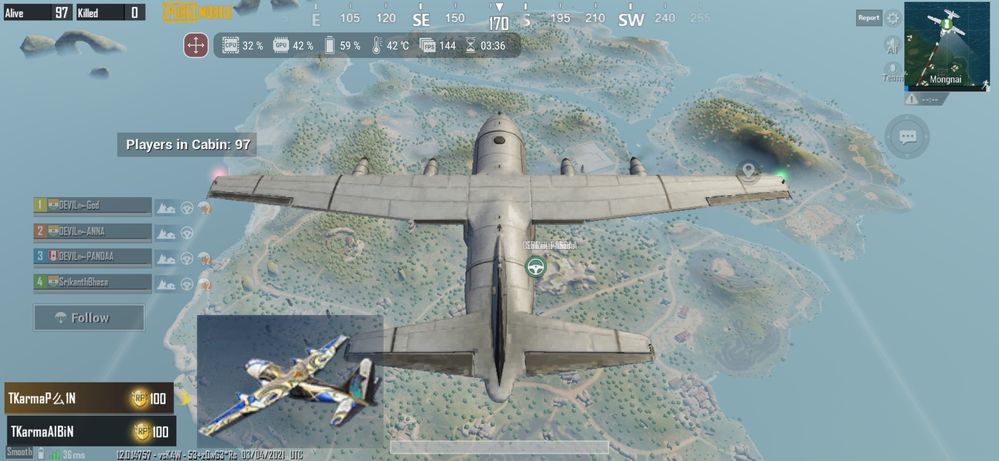
Today I watched some of videos I found pubg can run maximum resolution of our display , asus rog 3 support 144hz so I just make a try if it Yes 144 fps is working superb can't explain the feeling of playing at 144 fps pubg
Model Name:
Firmware Version:
Rooted or not:
Frequency of Occurrence:
APP Name & APP Version (If your issue relates to the app):
In addition to information above, please also provide as much details as you can, e.g., using scenario, what troubleshooting you've already done, screenshot, etc.
========================================
Today I watched some of videos I found pubg can run maximum resolution of our display , asus rog 3 support 144hz so I just make a try if it Yes 144 fps is working superb can't explain the feeling of playing at 144 fps pubg
60 REPLIES 60

Options
- Mark as New
- Bookmark
- Subscribe
- Mute
- Subscribe to RSS Feed
- Permalink
- Report Inappropriate Content
03-04-2021 12:45 PM
There's probably another way to do it similar to how @GREEKLEADER got 90fps, but upping it to 144 instead of 90

Options
- Mark as New
- Bookmark
- Subscribe
- Mute
- Subscribe to RSS Feed
- Permalink
- Report Inappropriate Content
03-04-2021 03:55 PM
Great! Now just enable screen recording and you can play at a capped 120hz refresh rate! Because y'know... "Performance issues".

Options
- Mark as New
- Bookmark
- Subscribe
- Mute
- Subscribe to RSS Feed
- Permalink
- Report Inappropriate Content
03-04-2021 05:34 PM
botboy444Getting 90 fps is different it takes 2 minutes and 144fps is something different 😬😬There's probably another way to do it similar to how @GREEKLEADER got 90fps, but upping it to 144 instead of 90
View post
Options
- Mark as New
- Bookmark
- Subscribe
- Mute
- Subscribe to RSS Feed
- Permalink
- Report Inappropriate Content
03-04-2021 05:40 PM
Options
- Mark as New
- Bookmark
- Subscribe
- Mute
- Subscribe to RSS Feed
- Permalink
- Report Inappropriate Content
03-04-2021 06:29 PM
SaifuddinThere is a confin file (Folder which contains 2 files) which need to place in pubg data very simple, it's not hack or something it's just an trick to get maximum fps option even it's worked in console or pc as wellhttps://zentalk.asus.com/en/discussion/comment/155353#Comment_155353
Can you tell us how did you manage to run pubg at 144fps?
View post

