[Wireless Router] What is PSC(Preferred Scanning Channel)?
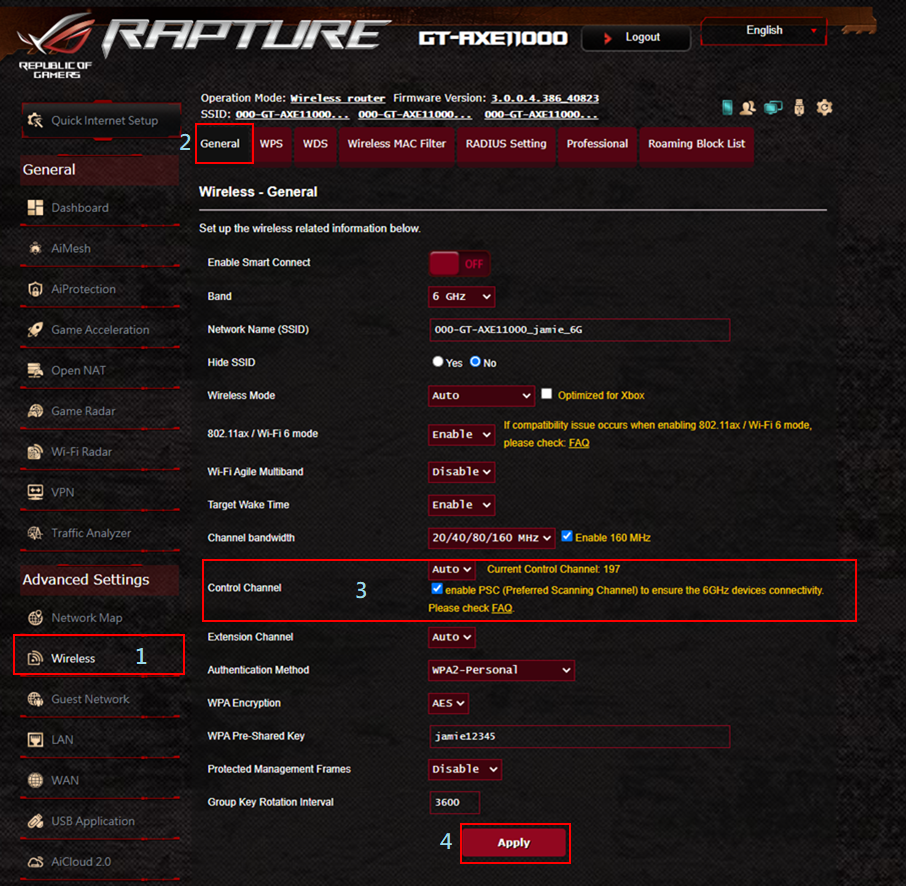
PSC (Preferred Scanning Channel) is a quick-select function for Control Channel aiming at improving your 6GHz devices’ connectivity. This function is introduced for WiFi 6E router, you will see PSC in “Wireless” -> “General” section of the Web GUI.
Based on the test result, using some of the 6HGz channels will lead to unexpected connectivity issues. To avoid the situation, we sort out some channels that your 6GHz devices have most likely to connect successfully and stably, and those channels are pre-selected as PSC channels. When PSC enabled, only those channels with higher connectivity will be kept for channel selection. This will reduce the possibility of connectivity issues to occur.
How to Enable PSC?
- Connect your computer to the router via wired or WiFi connection and enter your router LAN IP or router URL http://www.asusrouter.com to the WEB GUI.
- Key in your router's username and password to log in.
- Click “Wireless” -> “General” -> Check “Control Channel”
- Click “Apply”to save
How to Disable PSC?
- Connect your computer to the router via wired or WiFi connection and enter your router LAN IP or router URL http://www.asusrouter.com to the WEB GUI.
- Key in your router's username and password to log in.
- Click “Wireless” -> “General” -> Uncheck “Control Channel”
- Click “Apply”to save.
How to get the (Utility / Firmware)?
You can download the latest drivers, software, firmware and user manuals in the ASUS Download Center.
If you need more information about the ASUS Download Center, please refer this link.


