This widget could not be displayed.
This widget could not be displayed.
Turn on suggestions
Auto-suggest helps you quickly narrow down your search results by suggesting possible matches as you type.
Showing results for
- English
- Other Products
- FAQ
- [NUC] Use WMI Explorer* to Program the Ring LED an...
Options
- Subscribe to RSS Feed
- Mark as New
- Mark as Read
- Bookmark
- Subscribe
- Printer Friendly Page
- Report Inappropriate Content

 FAQBot
Community Manager
Options
- Article History
- Subscribe to RSS Feed
- Mark as New
- Mark as Read
- Bookmark
- Subscribe
- Printer Friendly Page
- Report Inappropriate Content
on
01-29-2024
06:52 PM
- edited on
10-07-2025
05:06 AM
by
ZenBot
[NUC] Use WMI Explorer* to Program the Ring LED and Button LED
NUC Kits NUC7i[x]BN come with Windows Management Instrumentation (WMI) Explorer* in the BIOS. With WMI Explorer, you can query and control the ring LED and button LED from the operating system environment. The WMI Explorer allows you to browse and view WMI namespaces, classes, instances, and properties in a single pane of view.
To Use WMI Explorer*
Click or the topic for details:
Enable LED software control
To enable the LED software control option in the BIOS before programming:
- Press F2 during boot to enter BIOS Setup.
- Go to Advanced > Power.
- In the Secondary Power Settings pane, set Ring LED and/or Button LED to SW control.
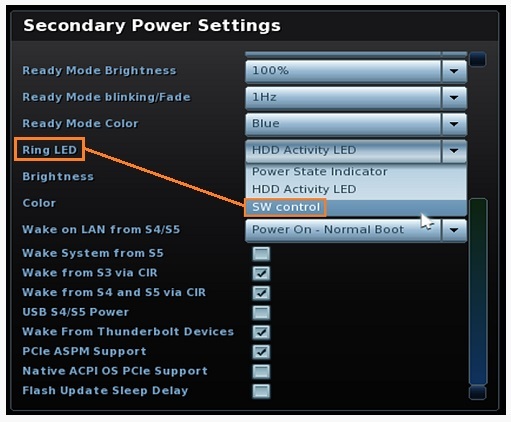
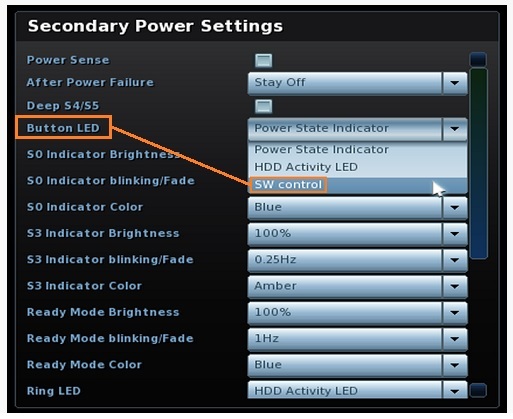
- Press F10 to save and exit BIOS Setup.
MOF to access LED programming tool
We recommend WMI providers implement new WMI classes in Managed Object Format (MOF) files.
We provide the specific MOF with the ASL code for you to access the LED programming tool in the WMI Explorer.
Use this MOF below to access the LED programming tool in the WMI Explorer:
- GUID: 8C5DA44C-CDC3-46b3-8619-4E26D34390B7
- _UID: 0
- Object ID (AA): 65, 65
- Instance Count: 1
- Description: Method for get or set the Button or Ring LED state.
- WMI Object Name: “CISD_WMI”
- Method ID(1): “GetState”
- Parameter 1: UINT32(Input)
- Parameter 2: Package(Array Data)
- Method ID(2): “SetState”
- Parameter 1: UINT32(Input)
- Parameter 2: Package(Array Data)
WMI Method Name and Arguments for LED Control
Get LED Status Function
| Control Method | WMAA | |
| Arg 0 | Instance | |
| Arg 1 | Method ID (01h) Get Function | |
| Arg 2 Input Parameter | Byte 0 | Function Number 01h - Get S0 Power LED command code |
| Byte 1 | Reserved | |
| Byte 2 | Reserved | |
| Byte 3 | Reserved | |
| Return Value | Byte 0 | Return Code 00h: No Error. Byte 1~3 offer the state. E1h: Error (Function not supported) E2h: Error (Undefined device) E3h: Error (EC doesn't respond) E4h: Error (Invalid Parameter) EFh: Error (Unexpected error) Others: Reserved |
| Byte 1 | Current LED Brightness state 00h: 0% ~ 64h: 100% | |
| Byte 2 | Using BIOS AY0029 or BN0042 Current LED blinking / fade state 01h: 1Hz Using BIOS AY0038 or BN0043 and later Current LED blinking / fade state | |
| Byte 3 | Current LED color state Button LED Color: (Get Power LED setting) 00h: Disable Ring LED Color: (Get Ring LED setting) 00h: Disable | |
Set LED Function
| Control method | WMAA | |
| Arg 0 | Instance | |
| Arg 1 | Method ID (02h) Set LED Function | |
| Arg 2 Input Parameter | Byte 0 | Select the LED 01h – Set S0 Power LED command code 02h – Set S0 Ring LED command code |
| Byte 1 | LED brightness setting 00h: 0% ~ 64h: 100% | |
| Byte 2 | Using BIOS AY0029 or BN0042 Current LED blinking / fade state 01h: 1Hz Using BIOS AY0038 or BN0043 and later Current LED blinking / fade state 01h: 1Hz | |
| Byte 3 | LED color setting Button LED Color: (Get Power LED setting) 00h: Disable Ring LED Color: (Get Ring LED setting) 00h: Disable | |
| Return Value | Byte 0 | Error Code of Ring LED brightness 00h: No Error |
| Byte 1 | Error Code of Ring LED blinking/fade 00h: No Error | |
| Byte 2 | Error Code of Ring LED color 00h: No Error | |
| Byte 3 | Reserved | |
Sample code to invoke the SetState Method
Example of sample code to invoke the SetState Method in the LED WMI interface:
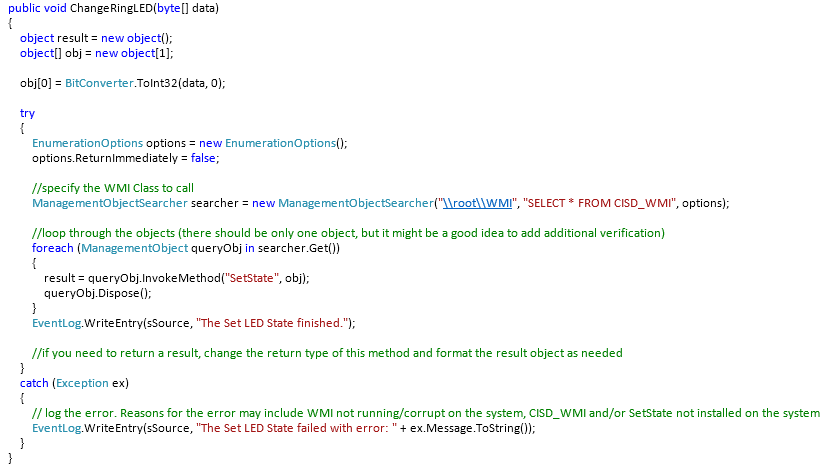
For more on how to write code to call into WMI, see:
