on 01-29-202406:52 PM - edited on 10-07-202504:58 AM by ZenBot
[NUC] NUC Does Not Wake Up When Scheduled
What are you seeing?
The NUC does not wake up when you have it set to do so in BIOS Setup.
Why are you seeing it?
Check to see if Windows* Fast Startup is enabled. This option is also called Hybrid Boot. When you shut down your computer with Fast Startup enabled, it appears as though a full shutdown to the OFF state (S5) has occurred. However, the computer is only hibernating. A Wake on S5 event can't be triggered when the computer is hibernating.
How to fix it
Disable Fast Startup so that when you shut down the computer, it shuts down completely to the S5 power state.
To disable Fast Startup in Windows® 10 or Windows 11*:
Type Power Options in the Search bar.
Select Choose what the power buttons do.
Select Change settings that are currently unavailable.
Uncheck Turn on fast startup in the Shutdown settings section.
Click Save changes.
To disable Fast Startup in Windows 8* or 8.1*:
Click the Start icon.
In the Search bar, type Power to bring up Power Options.
Select Change what the power buttons do.
Select Change settings that are currently unavailable.
Uncheck Turn on fast startup in the Shutdown settings section.
Click Save changes.
To configure an NUC to automatically wake up at a certain date and time when using Aptio BIOS:
Press F2 during boot to enter BIOS Setup.
Go to Power, Performance and Cooling > Secondary Power Settings
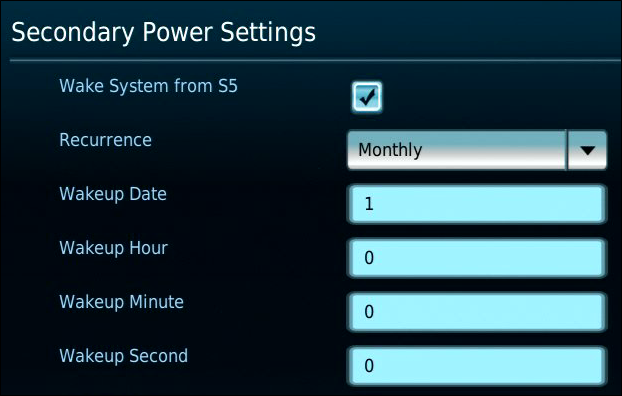
In the Secondary Power Settings pane, enable Wake System from S5.
Several options appear, allowing you to set how often and when you want the NUC to wake. The options can differ depending on the NUC model you have.
After making the settings changes, press F10 to save and exit BIOS Setup.
Figure 1: Wake System from S5 options using Visual BIOS.
To configure an NUC to automatically wake up at a certain date and time when using Visual BIOS:
Press F2 during boot to enter BIOS Setup.
Go to Advanced > Power.
In the Secondary Power Settings pane, enable Wake System from S5.
Several options appear, allowing you to set how often and when you want the NUC to wake. The options can differ depending on the NUC model you have.
After making the settings changes, press F10 to save and exit BIOS Setup.
Figure 2: Wake System from S5 options using Visual BIOS.
For NUCs with these options, you can set how often you want to wake the NUC using the Recurrence option (daily, weekly, or monthly).