[NUC] Display Configurations for Multiple Displays to NUC Rugged Chassis Element CMCR1ABA and CMCR1ABC
This guide provides the most common multiple display configuration options.
NUC Rugged Chassis Element CMCR1ABA and CMCR1ABB have the following:
- Two HDMI port (2.0a-compliant)
Before You Begin
We recommend you first update your NUC to the latest BIOS and graphics driver from Download Center.
Two displays
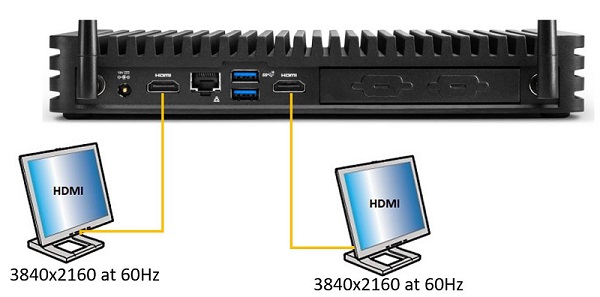
| Product | Display | NUC port | TV/monitor port | Maximum supported resolution |
| CMCR1ABA | 1 | HDMI | HDMI | 3840x2160 at 60Hz |
| 2 | HDMI | HDMI | 3840x2160 at 60Hz |

| Product | Display | NUC port | TV/monitor port | Maximum supported resolution |
| CMCR1ABB | 1 | HDMI | HDMI | 3840x2160 at 60Hz |
| 2 | HDMI | HDMI | 3840x2160 at 60Hz |


