[Motherboard]Why I see the error message "CPU FAN Error" in POST?
When you see the error message "CPU FAN Error" in POST, it means the system doesn't detect the FAN.
You can refer to the steps below to resolve the issue.
1. Please make sure the CPU FAN is installed on the right position of the motherboard and twist the screws tightly
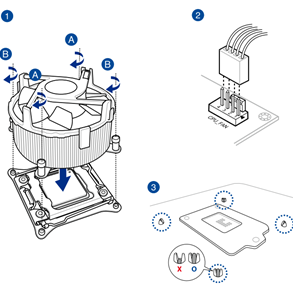
2. Ensure that the CPU FAN cable is securely installed to the CPU_FAN connector instead of the CHA_FAN.
3. If you install another brand of CPU FAN with lower revolutions speed, the system may not be able to correctly detect it.You can try to set "CPU Fan Speed Low Limit" to 200 RPM in BIOS configuration.
* "CPU Fan Speed Low Limit" appears only when you set the CPU Q-Fan Control to [DC Mode], [PWM Mode], and [Auto]. For those early versions, you need to set the CPU Q-Fan Control to [Enabled], [Advance Mode] or [Auto].
4. You can set Monitor->CPU FAN Speed to [Ignore] if you don't want to open the computer case.
*You can set the CPU FAN Speed to [Ignore] if your computer already comes with a liquid cooling system.
5. Update the BIOS to the latest version.
https://www.asus.com/support/faq/1044348/
If the issue still occurs, please contact ASUS Customer Support.


