[LCD Monitor] How to set up overclocking for LCD monitors?
1. Please check whether both your graphic card and LCD monitor are supported for overclocking.
2. Install the latest version of graphic card driver.
3. Use the available signal port(Please refer to the user manual of each model).
4. Adjust to the adopted frequency and resolution: How to adjust frequency and resolution of monitor
5. Adjust the monitor settings:
- Close Adaptive-Sync (Free-Sync) or G-Sync function so the resolution will be fixed to the defaulted setting.
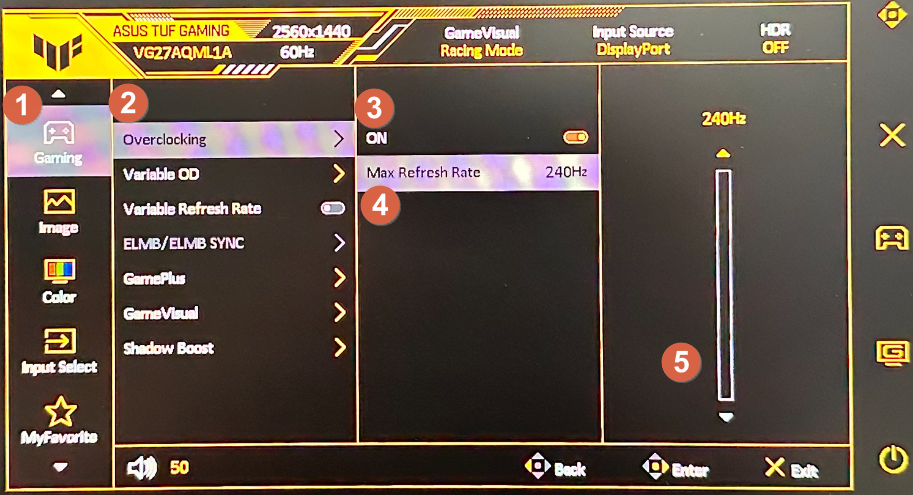
- Open OSD ->1.Gaming->2.Over Clocking->3.Select “ON” ->4.Max Refresh Rate->5. Adjust it to the refresh rate you want.
Example: VG27AQML1A
Note:
1.If you don’t see any image, disconnect the signal cable(DP or HDMI) and use the monitor OSD to try again with a lower Max Refresh Rate.
2.Please note that Over Clocking function/performance depends on the GPUs or contents displayed.
*ASUS only provides this function. The performance or any side effect after activation is not guaranteed.


