[Chromebook] Why Storage Space is Reduced When Logging in as a Guest
If you log into your Chromebook as a guest, the storage space differs from when logging in with a Google account. Please refer to the following explanation. (The image on the left shows logging in with a Google account; the image on the right shows logging in as a guest.)
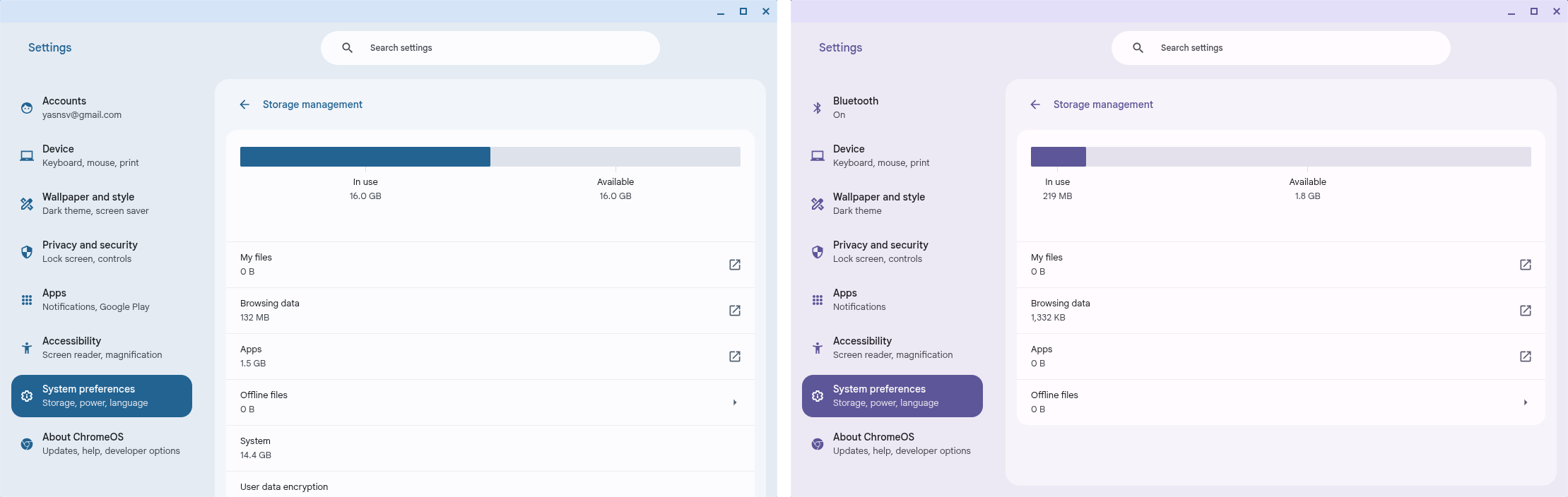
In the Chrome operating system, logging in as a guest limits the available storage space (the actual available space may vary based on the device and Chrome OS version). This is a normal design behavior of Chrome OS and is not due to hardware malfunction or reduced storage capacity. The main reasons are as follows:
- Privacy and Security Design: Guest mode primarily provides a temporary and secure login environment, limiting access to system resources to protect user data.
- Storage Isolation Restriction: To prevent guest accounts from affecting the system, the system restricts the available space.
- Data Non-Retention: All activities and data in Guest Mode are automatically cleared after the device is turned off, without any preservation.


