[Chromebook] How to reset your Chromebook hardware (Hard reset)
To solve some Chromebook problems, you might need to reset your hardware of Chromebook (It also called as Hard Reset). The Hard Reset should be performed only when you cannot solve problems via other solutions.
The Hard Reset will restart the hardware of Chromebook (such as keyboard and touchpad), and it might delete some files in the download folder.
For the Hard Reset steps on most of the Chromebooks, please refer to the following steps:
- Power off the Chromebook (Press and hold the power button for at least 4 seconds to force shut down)
- Press and hold the [Refresh button], then click the [Power button] to power on.

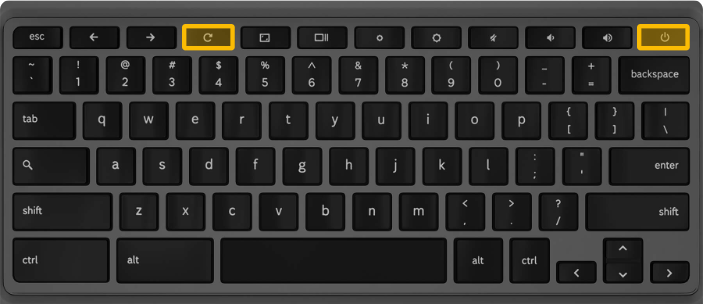
- Release the [Refresh button] until the Chromebook restarts.
If you are using Chromebook Tablet: please press and hold [Volume up button] and [Power button] for 10 seconds at least, then release them.



